

 by admin
What Is Instagram Branded Content? Master Instagram Branded Content Tools
In today’s digital world, trust is paramount. That’s why Instagram branded content, where creators authentically feature partnered brands, is so effective.
Consider this: 63% of young adults trust influencer opinions over brand claims, and 82% are more likely to purchase based on genuine creator usage. This translates to significant benefits for brands, with branded content ads seeing a 53% higher click-through rate and a 19% lower cost per acquisition.
Mastering the “paid partnership” tag is key for transparency and unlocking crucial analytics.
Throughout this guide, we’ll walk you through everything you need to know about Instagram’s branded content tools, from basic setup to advanced promotion strategies. Whether you’re a creator looking to monetize your influence or a brand aiming to expand your reach authentically, these tools offer tremendous potential for growth.
What Is Instagram Branded Content?
When scrolling through your Instagram feed, you’ve likely encountered posts marked with “Paid partnership with [brand]” at the top. These clearly labeled collaborations represent the foundation of Instagram’s branded content ecosystem.
Definition and Purpose of Instagram Branded Content
Instagram officially defines branded content as “a creator or publisher’s content that features or is influenced by a business partner for an exchange of value”. This exchange extends beyond monetary compensation to include free products or services. Essentially, whenever creators post content featuring a product after receiving payment or gifts from a brand, they’re creating branded content.
This strategy focuses on storytelling rather than traditional advertising. Through authentic narratives and experiences, branded content aims to build emotional connections with audiences. Furthermore, this approach allows brands to showcase their personality and values through creator partnerships.
How Does It Differ From Regular Posts?
The most visible difference is the mandatory “Paid partnership” label that appears at the top of branded content. This transparency feature is available across multiple formats—Feed posts, Stories, Live broadcasts, Reels, and videos.
- Unlike regular posts, branded content requires specific account types:
- Must be posted from business or creator accounts
- Requires approval from the tagged brand partner
- Gives both parties access to performance metrics
Moreover, branded content offers two distinct collaboration options: collaborative posts shared to both accounts’ feeds or single-account posts with the paid partnership tag.
Why It Matters For Brands And Creators?
For brands, these partnerships unlock significant advantages. They gain access to creators’ engaged followers, leveraging established trust and credibility. Creators likewise benefit by:
- Monetizing their content and influence
- Building a professional reputation through official brand partnerships
- Maintaining creative control while disclosing commercial relationships
Instagram branded content tools ultimately create a transparent ecosystem where creators can monetize their influence, brands can reach engaged audiences, and followers can clearly identify sponsored content.
What Are Instagram Branded Content Tools?
Instagram’s suite of branded content tools empowers both creators and brands to form transparent partnerships. These tools transform ordinary collaborations into official, measurable marketing relationships. Let’s explore the core elements that make these tools valuable for your marketing strategy.
Paid Partnership Tag Explained
The paid partnership label serves as the cornerstone of Instagram’s branded content system, appearing at the top of posts where location tags typically display. This disclosure tool transparently signals to audiences that the content resulted from a commercial relationship. According to Instagram’s policies, this label must be used whenever creators receive monetary compensation or free products and services.
First introduced in 2017, this feature initially launched with limited availability but has since expanded to all eligible business and creator accounts. The label appears consistently across multiple content formats, including Feed posts, Stories, Reels, Live broadcasts, and videos.
Tagging Collaborators And Brands
Instagram offers two distinct methods for creator-brand collaboration tagging:
- Paid Partnership Label: Found under Advanced Settings when creating content, this option allows creators to tag brand partners directly. After tagging, the brand receives a notification and can either approve or deny the partnership request.
- Collaborator Invitation: This option enables both parties to share ownership of a post, displaying it on both profiles simultaneously.
For brands, managing these collaborations happens through two approval methods—manually approving individual creators or establishing an auto-approve list for trusted partners. This system gives brands control over who can officially represent them through branded content.
Insights And Analytics Access
Perhaps the most valuable aspect of these tools is the shared access to performance metrics. When properly tagged, both creators and brands gain visibility into how branded content performs.
The analytics available vary by content format:
- Feed posts: Reach and engagement metrics with no time limit
- Stories: Reach, taps forward/backward, replies, and exits (available for 14 days)
- Live broadcasts: Performance data accessible for up to two years
Through these insights, brands can evaluate partnership effectiveness while creators can demonstrate their value with concrete metrics rather than just follower counts.
How to Set Up and Use Instagram Branded Content Tools
Before diving into Instagram’s branded content features, you need to understand who can access these tools and how to set them up properly.
Eligibility Requirements For Creators and Brands
Getting access to Instagram branded content tools requires meeting specific criteria. To qualify, both creators and brands must:
- Have a business or creator account
- Maintain an authentic, established presence with original content
- Comply with Instagram’s Community Standards
- Follow all Branded Content Policies and Content Monetization Policies
Political entities and government officials face additional restrictions or may be ineligible entirely. Although Instagram doesn’t explicitly state a minimum follower requirement.
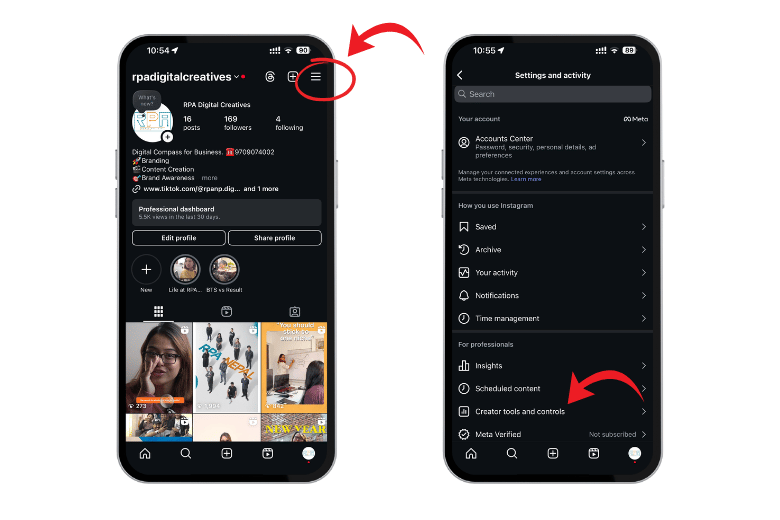
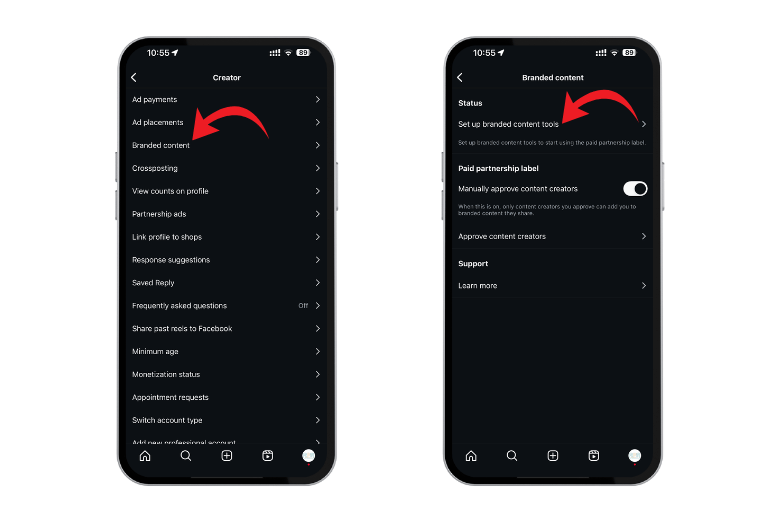
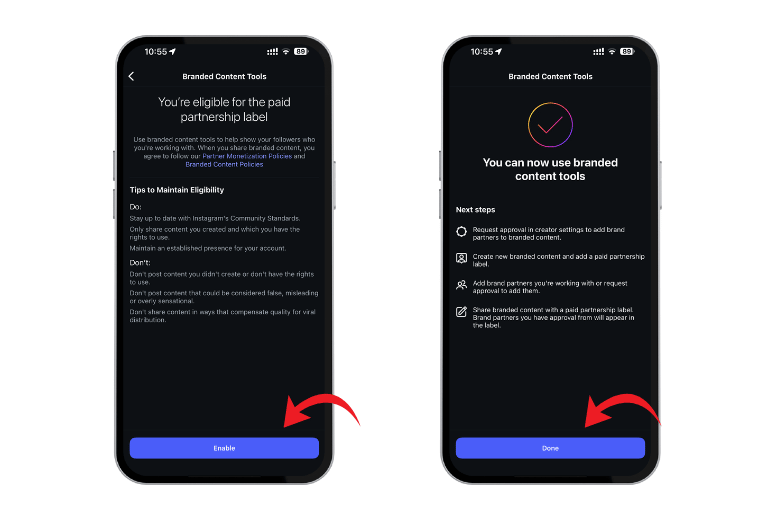
Steps To Enable Instagram Branded Content Tools
Once you’ve confirmed eligibility, enabling these tools involves a straightforward process:
- Open Instagram and go to your profile
- Tap Menu in the top right corner
- Select “Business tools and controls” or “Creator tools and controls”
- Tap “Branded content”
- Choose “Set up branded content tools”
- Tap “Enable” if eligible (or request a review if not)
After setup, you’ll gain access to partnership labeling across all content formats.
How To Add Paid Partnership On Instagram Post
For Feed posts, simply:
- Create your post normally
- Tap “Advanced settings” or “More options” before publishing
- Under “Branded content,” toggle on “Add paid partnership label”
- Tap “Add brand partner”or “Add paid partnership label” and search for the brand
- Optionally, enable “Allow brand partner to boost”
- Tap “Done” and publish
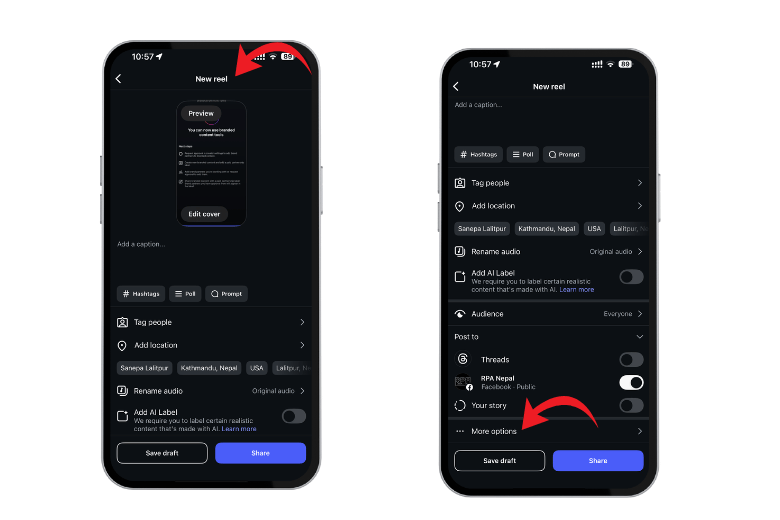
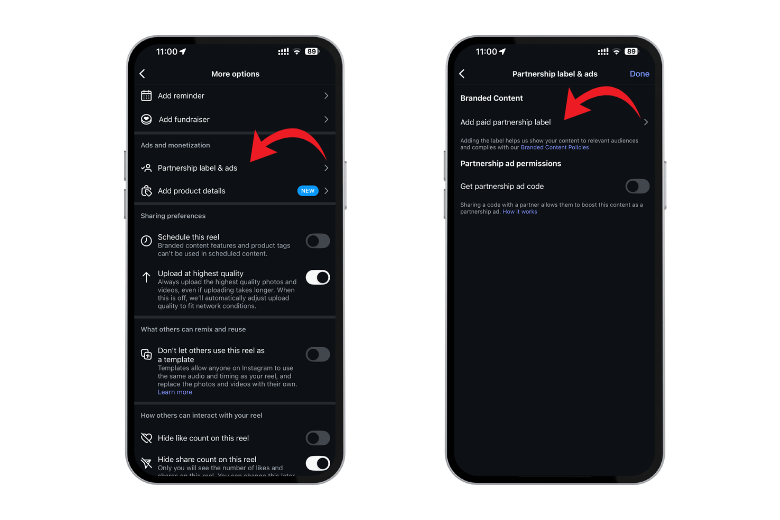
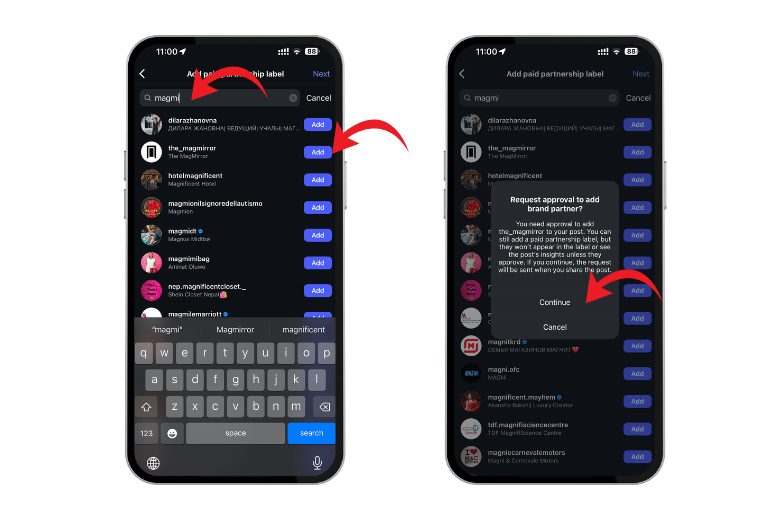
Similar processes exist for Stories, Reels, Live broadcasts, and Channel messages.
Manual vs Auto-approval of Tags
Brands control who can tag them through two primary methods:
Manual approval: Requires individually approving each creator request. To manage this:
- Navigate to your profile > Menu > Business > Branded content
- Toggle “Manually approve content creators” ON
- Under “Approved content creators,” search and add specific creators
Auto-approval: Alternatively, brands can toggle off the approval requirement, allowing anyone to tag them, although this approach isn’t generally recommended for brand safety.
This verification system prevents unauthorized creators from appearing as official partners.
Creating and Promoting Branded Content Ads
Once you’ve mastered the basics of branded content tools, transforming collaborative posts into high-performing advertisements unlocks even greater reach and impact for your partnerships.
Creating branded content in Feed, Reels, Stories, and Live
Each Instagram format requires specific steps to properly label sponsored content before promotion. For Feed posts, after creating your content, tap Advanced Settings, toggle “Add paid partnership label,” and select up to two brand partners.
For Stories, the process differs slightly—tap the tag icon at the top of your screen before posting, then toggle the partnership label. With Reels, go to Advanced Settings after recording your video and enable the paid partnership option. During Live broadcasts, tap “Details” once you’ve started streaming, then select “Add brand partners”.
Boosting Posts And Turning Them Into Ads
You can transform organic branded content into ads through two primary methods. The first requires creators to toggle “Allow brand partner to boost” when tagging a business. This grants brands permission to promote the content directly.
Alternatively, creators can generate a unique partnership ad code. This code is specific to one advertiser and can only be used once, providing greater control over promotional rights.
How To Generate Instagram Ad Code For Partnership Ad
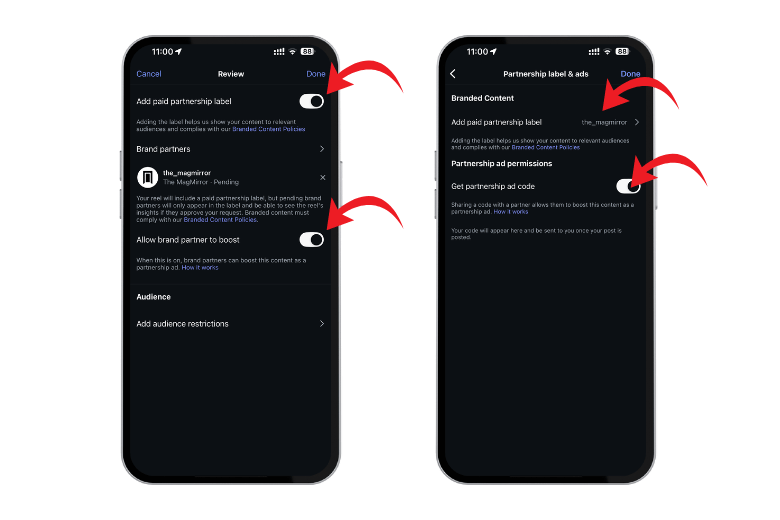
- The creator must choose the post they want to use for the partnership ad
- Then click the three dots on the post and select Partnership label & ads
- the option for Add paid partnership label
- Click Add brand partner and select the brand’s Instagram username. Then, toggle the option for Allow brand partner
- Click on Get partnership ad code, then copy the code and share it with the brand
- Click done to save and confirm the updates
Using Ads Manager To Create Branded Content Ads
For more advanced promotion, use Meta Ads Manager:
- Open Ads Manager and click “Create”
- Select your campaign objective (awareness, traffic, engagement, etc.)
- Define audience, budget, and placement preferences
- At the ad level, toggle “Partnership ad” option
- Enter the partnership ad code or select the tagged content
- Choose Primary and Partner Identity accounts
- Finalize settings and publish
Branded content ads work across multiple formats, though specific requirements exist—Reels must be under 15 minutes with royalty-free music, and Stories must be under 60 seconds.
Tracking Performance And Insights
After launching ads, both creators and brands gain access to detailed performance metrics. For feed posts, view reach and engagement data without time limits; for Stories, track metrics for 14 days; for Live content, insights remain available for up to two years.
To access these insights as a brand, navigate to Meta Business Suite > All Tools > Insights > Branded Content section. These metrics reveal not just surface-level engagement but also detailed data about who engaged with your content.
Read More: What is TikTok Spark Code And How To Get It?
FAQs
Q1. What is Instagram branded content and how does it differ from regular posts?
Instagram branded content is a collaboration between creators and brands, where creators post content featuring a product or service in exchange for payment or other benefits. Unlike regular posts, branded content is clearly labeled with a “Paid partnership” tag and requires approval from the tagged brand partner.
Q2. How can I enable branded content tools on Instagram?
To enable branded content tools, you need a business or creator account. Go to your profile, tap Menu, select “Business tools and controls” or “Creator tools and controls,” tap “Branded content,” and choose “Set up branded content tools.” If eligible, tap “Enable” to access these features.
Q3. What are the benefits of using Instagram’s branded content tools for brands and creators?
Brands benefit from higher engagement rates and lower acquisition costs, while accessing creators’ engaged audiences. Creators can monetize their influence, build professional relationships with brands, and maintain creative control while disclosing commercial partnerships transparently.
Q4. How do I add a paid partnership label to my Instagram post?
When creating a post, tap “Advanced settings” before publishing. Under “Branded content,” toggle on “Add paid partnership label.” Tap “Add brand partner” to search for and select the brand. You can also enable the option to allow the brand partner to boost the post if desired.
Q5. Can branded content be turned into ads, and how does this work?
Yes, branded content can be transformed into ads. Creators can allow brand partners to boost posts or generate a unique partnership ad code. Brands can then use Meta Ads Manager to create more advanced promotional campaigns using this content, reaching a wider audience and tracking performance metrics.